Mon 31 Dec 2007

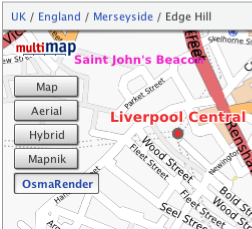
I’ve put together a new version of my OSMify bookmarklet. The main reason for doing this is because the old version is linking to the wrong set of Osmarender tiles; it’s linking to the ones on dev.openstreetmap.org rather than the newer ones on tah.openstreetmap.org. Rather than force you to regularly visit this site and setup a new bookmark every time there’s an update, I’ve decided to host the JavaScript for this version of OSMify on my site.
In the previous version, all of the JavaScript to make the new map types appear was contained within the one line bookmark. This time I’ve put all of the important JavaScript into a separate file hosted at johnmckerrell.com/files/osmify.js. The bookmark now only contains some simple JavaScript required to load that file in.
As well as allowing me to make improvements to the code this also makes the code a lot more readable, allowing you to read through it and understand what it’s doing. If you have any improvements that you’d like to suggest then either drop them as comments on here or email them through to me.
One improvement I did want to attempt was to make OSMify work on other sites than Multimap’s. The Multimap API’s custom map type support works in a very similar way to the Google API so it would be easy to support. Microsoft Virtual Earth/Live Maps also have a method for putting custom tiles into their API. Unfortunately with Google, they don’t expose the full API on their public site (i.e. maps.google.com) so it isn’t possible to add custom map types there. The current version of OSMify will work with third-party implementations, though they will need to expose a global map variable that is of type GMap or GMap2. I have also had to tell the code to add a new GMapTypeControl after adding the new map types as for some reason the Google API’s map type control doesn’t update when you add new map types (something the Multimap API does do). I haven’t bothered with Virtual Earth/Live Maps support either yet as I would need to code up my own widget/control for switching between these map types (or tile layers as they call them).
So, the link is at the top of this post, have a go with it and let me know what you think. I’d especially be interested in some feedback on using this with Google maps implementations, and any thoughts you have on getting this to work with more APIs.
Technorati tags: javascript, bookmarklet, osm, openstreetmap, map, liverpool, multimap, maps, favelet
December 31st, 2007 at 1:23 pm
Brilliant, this is just what I was going to be looking for so I could avoid google maps.
I went to the geocaching website:
http://www.geocaching.com/seek/gmnearest.aspx?lat=51.41363&lon=-0.36457
The mapnik/osmarender buttons appear but don’t seem to work or do anything.
Do you have an example of anywhere with google maps where it works?
December 31st, 2007 at 1:53 pm
@Gregory – I had a look at what was happening and it’s looks like it was actually a bug in my code. I’ve fixed that now and the page you mention seems to work fine, they’re using a global map variable.
January 1st, 2008 at 8:10 pm
[...] Blog What I Made » New version of OSMify bookmarklet This bookmarklet can add an OSM layer to most Google Maps API implementations. Awesome! (tags: maps openstreetmap google opensource wiki) [...]
January 8th, 2008 at 3:37 pm
Hey,
thanks for this.
But somehow this doesn’t work for http://www.theairdb.com
Tobi.
January 8th, 2008 at 3:38 pm
Addition:
here’s a directlink to a mappage:
http://www.theairdb.com/airline/ryanair.html
January 8th, 2008 at 4:17 pm
@tobi – That page was putting its GMap in a variable called map1 whereas OSMify was only looking for a variable called “map”.
I’ve now updated the script so that it’ll look for the first global variable of type GMap, GMap2 or MultimapViewer so it now works on that page.
January 10th, 2008 at 12:42 am
Very cool hack. Nice to see how accurate my maps are
January 10th, 2008 at 8:15 pm
Hi,
thanks for the great script.
Unfortunately this doesn´t work with http://www.geocaching.de/index.php?id=10
Jonas
January 11th, 2008 at 3:20 pm
@John07 – OSMify only (now) looks at global variables to find the map. The page you linked to has an iframe, and the map is inside that iframe. I’m not sure I would want it to have to go through all iframes looking for maps, it’s bad enough having to go through all the global variables at the moment!
I can see that it would be good to have OSMify work with maps created by google’s “embed” feature though so I might take a look into an iframe solution sometime.
January 13th, 2008 at 11:16 am
For those who use mapmyride.com, context click on the area to the left of the map, and choose “Open frame in new tab/window”. You can then use OSMify.
January 13th, 2008 at 11:17 am
Can you include the cycle layer as one of the additional options?
January 14th, 2008 at 1:47 am
@Shaun – I’ve added the cycle layer (using the tiles on gravitystorm.co.uk hope that’s right).
I’ve also shortened Osmarender to Osma to save on space.
If anyone has any good suggestions for how I can handle iframes I’m all ears. If anyone knows a good, speedy, way of detecting google map viewers within a page then I’m all ears. If I have that then I might even be able to just run the function on all iframes on a page.
January 17th, 2008 at 11:29 pm
Thanks for adding the Cycle layer
January 19th, 2008 at 10:40 pm
[...] OSMify ist super. Es integriert OpenStreetMap in Google Maps. Egal auf welcher Seite Google Maps integriert ist, ich kann es mir auch auf der OSM-Karte anzeigen lassen. Und diese sollten wir ja alle vorziehen oder?
. [...]
February 13th, 2008 at 7:25 pm
If i search Google for osmify and click your site Google says me that you host spyware. Maybe Google don’t like osmify?
March 10th, 2008 at 9:45 am
[...] became much easier for me to geocache in Durham since Christmas time, when the OSMify bookmarklet was updated. When your viewing a Google Map on a website, such as the geocaching.com map view, you [...]
December 19th, 2008 at 12:48 am
This doesn’t work on maps.google.com for me. It does work on the ryanair link above and the Marengo GPS route planner, which both embed Google Maps. It seems like they are using a different version of Google Maps though – the one on maps.google.com has a different direction and zoom motif – the direction motif has a little hand with a circle around it, and a little man above the zoom slider!
February 27th, 2009 at 11:59 am
[...] funktionieren sollte (aktiviertes JavaScript vorrausgesetzt). Dafür müsst ihr nur dieses Blog besuchen, wo ihr OSMify einfach “installiert”, in dem ihr den Link unter dem Bild oben einfach [...]
February 27th, 2009 at 12:04 pm
Hallo, nice JavaScript hack
Is there the posibility to integrate this OSM Renderer?
http://opentiles.com/nop/
For Geocachers or hiker in Germany I think this is a nice map.
Greetings
February 27th, 2009 at 12:26 pm
Hi
I probably wouldn’t put this tile layer into the main OSMify plugin, but if you would like to extend the JavaScript to make your own version it would be quite simple to modify the file that you can find at http://johnmckerrell.com/files/osmify.js to add your own layer and then modify the bookmarklet to load that file instead.
Do let me know if you have any problems with that.
John
February 27th, 2009 at 4:33 pm
Hi John, I’ve got some problems
.
Adding just one (or more) new map is no problem. But due to license problens the hiking map is rendered newly in two tiles with transparency (one for the highs-layer and another with the rendered OSM-data).
If I only show the OSM-layer it looks flat. So how can I render both layers the same time (like Google-Sat with extra Streetlayer)? I’ve no experience with the google-map-api and nearly no experience with JavaScript …
The next question is about the license of your script? Could I put a modified version on my own server for the german geocachers?
Greetings Florian
February 27th, 2009 at 4:44 pm
Consider the code public domain, you can host a modified copy or do whatever you want.
You should be able to create two tile layers, i.e. two GTileLayer objects. If you notice these lines:
var tilelayer = new GTileLayer( copyrightCollection, obj.minResolution ? obj.minResolution : 0, 18 );
tilelayer.getTileUrl = obj['callback'];
var tilelayers = [ tilelayer ];
You would essentially need to duplicate the first two lines, and then include the second tile layer in the last line, e.g.:
var tilelayers = [ tilelayer, tilelayer2 ];
The existing custom_map_types structure doesn’t really allow for this but you should be able to expand it or hack the script to allow.
July 20th, 2009 at 12:49 am
osmify uses an old version of the cyclemap. The URLs you are using are like http://thunderflames.org/tiles/cycle/12/2012/1277.png but it should be like http://a.andy.sandbox.cloudmade.com/tiles/cycle/12/2012/1277.png – compare the two and you will see the differences, the latter being more recent.