Sun 22 Oct 2006
While recently looking into Google Gadgets and pondering on the possibility of an open gadgets API that allowed you to place gadgets on your own site that were hosted elsewhere, I came up with a method that can be used for resizing IFrames where the page within the IFrame is hosted on a different domain.
A simple search for “resizing iframes” on Google returns 581,000 results, and the first one that I found gave a perfectly reasonable method for resizing iframes when all the content is stored on a single domain. Unfortunately due to the security restrictions in modern browsers, JavaScript in a page hosted on one domain cannot access a page hosted on an alternative domain, even if you really really want it to. But there is a way to allow communication.
So first, before I describe the solution I’ll mention a caveat – this solution relies on the page in the iframe doing something. This means you can’t have resizable iframes for just any content – either you have to have control of the content in the iframe or its owner has to make functionality available to you, but I think that’s a good security restriction. You have to trust the content you’re linking to if you’re going to implement this.
So – on to the solution. Put an iframe in your iframe. That’s it, that’s all you need to do. Come back next week for how to make Windows completely safe from viruses and Mac OS popular………..
What? You want more details? How about if I tell you to make the inner iframe link to something in the main window’s domain, does that help?
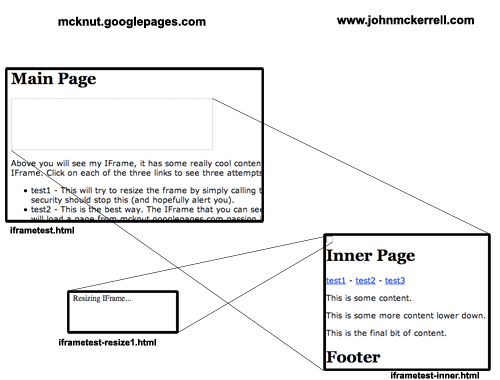
The diagram above aims to show you what I mean by this. You can also see this example in action. The main page in the example is served by the host mcknut.googlepages.com. It in turn has an iframe on it with some content from www.johnmckerrell.com. The three links inside the iframe try three different methods for resizing the iframe.
- The first link tries to simply access the parent window directly. This will not work on any modern browsers as it will be flagged as a security violation.
- The second link tries the best solution. There is a hidden iframe inside the main iframe. When you click on the second link iframe-resize1.html is loaded into the hidden iframe from mcknut.googlepages.com. iframe-resize1.html is passed a height value from the main iframe and then using JavaScript can access the main window, instructing it to resize the iframe. This is not flagged as a security risk because the domain of the page in the hidden iframe is the same as that of the main window.
- The third link tries another alternative which also works, but is slightly more cumbersome. This version loads the resizing page in the main iframe. The resizing page is served from the same domain as the main page and calls some JavaScript on the main page to resize the iframe. It then uses a callback mechanism to return the iframe to the original page. This is more cumbersome as it has to reload the content in the iframe, and would not be suitable for an iframe with dynamic content that might need resizing numerous times.
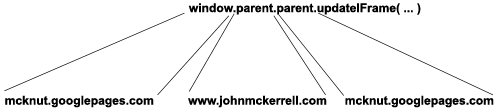
So, to wrap up, the second solution mentioned above is the ideal way, as it resizes the iframe without affecting the content within it. I see a definite security problem here if you have multiple iframes with content from multiple domains in, as you might find that any iframe would end up with the ability to impersonate any other iframe. I think this could be solved though by labelling the iframes using random strings and using these strings when communicating from iframe to main page. I’m also not entirely sure about the validity of the window.parent.parent.updateIFrame() line. As you can see from the diagram below, it looks like I’m being allowed to cross domains in my JavaScript which of course should not be possible. If this turns out to be a security violation that browsers are likely to fix, though, I think window.top.updateIFrame() would suffice in most circumstances, and should in theory be fine.
Please leave comments to let me know what you think of this solution. I’ve not been able to find it in use anywhere else but if you’ve seen something similar before then let me know. Also if you have any suggestions for improvements I’d be happy to hear them. I’ve been intending to have a go at a mechanism to allow two way communication between the iframe and the main page (currently you still wouldn’t be able to pass information into the iframe from the main page) but I haven’t had time to knock something up so if you do, let me know.
UPDATE: IFrame Example Code – I’ve now collected the files together into a zip file that you can download. You will need to change the domains (mcknut.googlepages.com and johnmckerrell.com) to your own domains though for it to work correctly.
UPDATE2: Basic iframes demo – I’ve stripped the example down to the three files you need and structured them into a hierarchy that should make it clearer which files go on which domain.
On second thought… I was able to get the isze to increase… how do I get it to decrease when going to the next page… I seem to be stuck at whatever the largest page was/is.
Thanks a lot, this worked beautifully.
still fighting with the width here. Seems to work great for height. but once your page width increases, I cant get it to shrink back down when accessign another page in the iframe. Any ideas?
Is there an element within the iFrame that you can use to measure the width rather than measuring the width of the iFrame page? The problem is that once you’ve increased the width, that basically “is” the (minimum) width so you won’t be able to get it to shrink by detecting a property of document.body. I guess you must have some element that has a size smaller than the size of the iframe so if you use that you should have better results. You will of course need to add some pixels to the width of that element if you want padding.
Thank you for sharing. This worked perfectly for me and this is by far the simplest way to do cross-domain resizing.
Using the same words as Bethany, thanks a lot for sharing this. I have searched lots of links on internet, but this was the only way I could make it! God bless!
Hi John,
I have searched far and wide and this seems to be the closest to what I need but I need your advice on a slight variation. I have a page with an iframe in it. This iframe is loading a vacancies application which exists on another domain and as you click through the various option in this application the page changes height. I have added the ID into the iframe tag and also added the JS into the top of the page on the parent domain. However, I want this other domain to simply load into the iframe when the parent page loads rather than clicking an initial link in the iframe to then load the other domain.
I have got access to the other domain although the pages are created dynamically so I’m not sure where to add the necessary code to these pages and indeed what to add!
Any advice would be very welcome.
Is it as simple as adding:
function test2() {
var iframe = document.getElementById( ‘inneriframe’ );
var wrapper = document.getElementById( ‘wrapper’ );
var height = Math.max( document.body.offsetHeight, document.body.scrollHeight );
iframe.src = ‘http://mcknut.googlepages.com/iframetest-resize1.html?height=’+height;
}
function addContent( newcontent ) {
var wrapper = document.getElementById( ‘wrapper’ );
var newpara = document.createElement( ‘p’ );
wrapper.appendChild( newpara );
newpara.appendChild( document.createTextNode( newcontent ) );
}
:to the other domain’s page head and adding:
:on the other domain’s page somewhere?
Many thanks,
Debbie
[…] on you being able to put code on your server, and being able to modify the source of the IFrame. Another solution I found relies only on modifying the source of the IFrame, but I found the hackiness […]
Anyone get this to work with safari or tested with safari? mine doesnt work with the latest version. its fine with everything else though
@Peter – I’ve just tried the simple demo above in Safari 4 and it seems to work.
Hi John,
Thanx a ton to u r solution…
But i have some issue… I am getting the param and the height but getting the permission denied to get property Window.top.updateIFrame
Not sure of wat the problem is…
Wat i did was in X-domain i have the same content as mentioned in iframetest.html and in Y-domain i have iframetest-resize1.html content… When i try calling it from Y-domain i am getting the above said error…Help me out.
Thanx ina dvance for all ur valuable suggestion…
I tried the way what you suggested, but no luck for me. I am not sure where it went wrong , Please help me.
Assume i have two domains A and B
In Domain A I kept the onLoad() and updateIframe () methods.
In domain B i kept the test2() method
While calling the method updateIframe() from onLoad() method its giving Permissio denied.
Here the method names which i used are in samples which one you provided
Please help me
Thanks
Sam
Sam and Mani, I’m afraid there’s not much I can do other than suggest you go through your code again and make sure you’ve got the right files in the right places. If you can give a link to your code I may be able to offer more suggestions but without that all I can say is “Good Luck”!
[…] Blog What I Made » Resizing IFrames Across Domains (tags: javascript iframe xss) […]
I’ve been reading and going through this for the last few hours, as I really want to make my blogger work within my indexhibit site.
Is it just me or are there a lack of instructions here?
There’s plenty about the theory but not much on what code to put where, I’m so lost. What do I do with the four different html files exactly?
John,
Thank you for your beautiful solution! I have managed to embed my blogger blog into my personal web page and now I have even strip the alert, I didn’t notice the alert line before :$
You are great, man. Your solution awesome.
@Blas – glad you like it.
@Adam – I’ve put a cleaner version of the files into a zipfile I’ve mentioned on update 2 above, labelled “basic” (should really be “clean” but oh well). Hopefully this will be easier to use.
Thanks so much, been looking everywhere for this. Genius. Pure genius.
Dear John,
For a while now i have been trying to implement your solution to my site. Unfortunately without any result. When I take a look at your example “see this example in action” non of the three links seem to alter the height of the frame either.
On my site the Iframe width and height simply remain 400 and 100 px as is written in innerframetest.html. Do I need to change these numbers?
Thanks for any help!
[…] Adam Fortuna explored some options using kind of a man-in-the-middle idea. This may have been inspired by a technique by John McKerrell. […]
[…] Adam Fortuna explored some options using kind of a man-in-the-middle idea. This may have been inspired by a technique by John McKerrell. […]
Hi all,
Has anyone figured out the solution for bringing the iframe to a longer height to a shorter height?
Been working on this for days!
Absolute pure awesomeness!!!!!! With a few hours of brain bashing I was able to get this working. I have files on 2 servers on our intranet and this was the ONLY way to make the frames pointing to the other server work.
The coolest part is that I was able to integrate it into Joomla!!! I saved the files out as PHP, placed the script into my Joomla template after a few minor changes it works swimmingly. It also plays nice with the other iframe script I was already using. So the frames for the host server use one script and yours for the “remote” files. I can’t kiss your a** enough. Thank you much!
Works beautifully.
Only problem is decreasing the iFrame to a shorther height. Repeat Suf’s question: “Has anyone figured out the solution for bringing the iframe to a shorter height?
Would be just perfect if this problem was resolved.
@Rachel, @Suf – to get it to go to a shorter height you’ll need to put your iframe content within a
Works great other than decreasing the iFrame to a shorter height.
Could you show code for measuring height of div to find out what the height of the content is rather than the height of the element as suggested in your last post?
200$USD contract offer!——————-
Hi, I need to get some coding work done using the technique described here. I am willing to pay to get it working. Here is my problem:
This is working:
I have a main window, which sends a search query to the google search box form in an iframe. So the search results are displayed normally in the Google interface in the iframe (target=iframe). So all the code to obtain and display the proper results in Google is already working.
I now want to extract the Google search results found in the iframe, so in the main frame I tried to do:
function getContentFromIframe()
{
var myIFrame = document.getElementById(“iframeid”);
var test = myIFrame.contentWindow.document.getElementById(“nr_container”).innerHTML;
document.getElementById(“resultdiv”).innerHTML = test;
}
But access is denied, so I presume it has something to do with the Same Origin Policy, as it is cross-domain scripting.
I presume I need to retrieve the innerHTML of “nr_container”, which is the id of the div where results are injected in the Google search results page, and pass it to my main frame, but I need more access. I downloaded the example here, and it seems to be the solution I need, but I can’t figure out how to make it work properly. Please send me an e-mail if you are welling to help me figuring out how to set up the solution and make some tests.
I am welling to pay up to 200$USD to the first person that will resolve this problem.
I will pay using International Money Order.
Please help me!
[…] Problem #2: I didn’t want the iframe to have a scrollbar, so I needed some kind of auto-resizing script. However, the ASP application couldn’t execute correctly in the SharePoint web directory, so the SharePoint site and the old web app were on two separate domains. Therefore, I needed a cross-site iframe resizing solution. Fortunately, they exist. […]
[…] not found) Posted by News On February 1st, 2011 / No Comments I’m using the code from John McKerrel to resize IFrames across domains (sample code is in a zip file there), there is an updated (bloated) version on CSS-Tricks: Cross […]
I have used your site and other- and found a mint solution! Check my post
http://stackoverflow.com/q/5908676/706363
I have used your info and others and hve found a mint solution. Check my post on SO
http://stackoverflow.com/q/5908676/706363
Great! I made it automatically resize itself by putting this after the function resizethisFrame {
…
}
setInterval(“resizeThisFrame()”, 1000);
This resizes the frame every second, BUT as the script changes the iframe.src, it also reloads the page, so the back-button gets messy, and might slow down the browser.
It would be awesome if there was some way to make the frame resize itself as the contents change.
Anyone got any tips on that?
[…] I found someone who does have a resolution. Full credit goes to John and his post here from […]
Simply incredible. I’ve been looking around for this forever. Incidentally, regarding this:
“currently you still wouldn’t be able to pass information into the iframe from the main page”
I found this link: http://www.codeproject.com/KB/aspnet/IFrameParams.aspx
Great solution and even greater that you provided such great documentation. Thank you.
The Basic iframes demo was exactly the solution I was looking for…unfortunately, it doesn’t appear to resize the cross domain iframe anymore in IE9 & FF13. I’ve installed the test files ok, but I get a vertical scroll bar on the inner iframe and it didn’t resize. Any new ideas on this subject?